Email Personalisation with Dynamic Email Content
Email personalisation means each subscriber gets an email shaped by what you know about them, not the same message as everyone else on your list. Dynamic email content is the practical way to do it. You build one email, and chosen parts of it change depending on who opens it.
Take a regional theatre announcing its spring season. Members of its Friends scheme see a priority booking link. Everyone else sees an invitation to join. The season listing in between is identical, and the theatre sends one email campaign, not two.
That season email runs through the examples below, from the first rule to the final test.
What email personalisation means
Email personalisation is the use of subscriber data to change what a person receives. The change can be as small as a first name or as large as a whole section. It is not one feature but four separate tools, and each one changes something different.
| Tool | What it changes | Example |
|---|---|---|
| Merge tag | A word or phrase | "Hi Priya" where others read "Hi there" |
| Dynamic content | A section inside the email | Members see a booking link, non-members see an invitation to join |
| Segmented campaign | Who receives the email | Only lapsed bookers get the "we miss you" offer |
| Automation | When the email is sent | A welcome email on the day someone signs up |
Mail merge fills a template with spreadsheet fields. If you are doing that in Word, the Outlook mail merge steps explain which Outlook version can send the copies.
A merge tag, also called a personalisation tag, is a placeholder replaced with each contact's own data at send time. The first name is the usual example, and it is the smallest part of email personalisation. A name in the greeting shows you hold that name. It does not make the rest of the message more relevant.
Segmentation and automation decide who gets an email and when. Dynamic content works one level down: it decides what each person sees once the message arrives. Many small teams skip that level, because the familiar alternative is building the same campaign twice.
What is dynamic email content?
Dynamic email content is any part of an email that is shown, left out or swapped according to data held about the recipient. You design the email once. At send time, each contact gets the version that matches their record.
In practice the unit that changes is a row: a horizontal band holding a heading, some text, an image, a button or a video. One row can go to members only. Another can appear only for people in Scotland. Rows without a rule go to everyone.
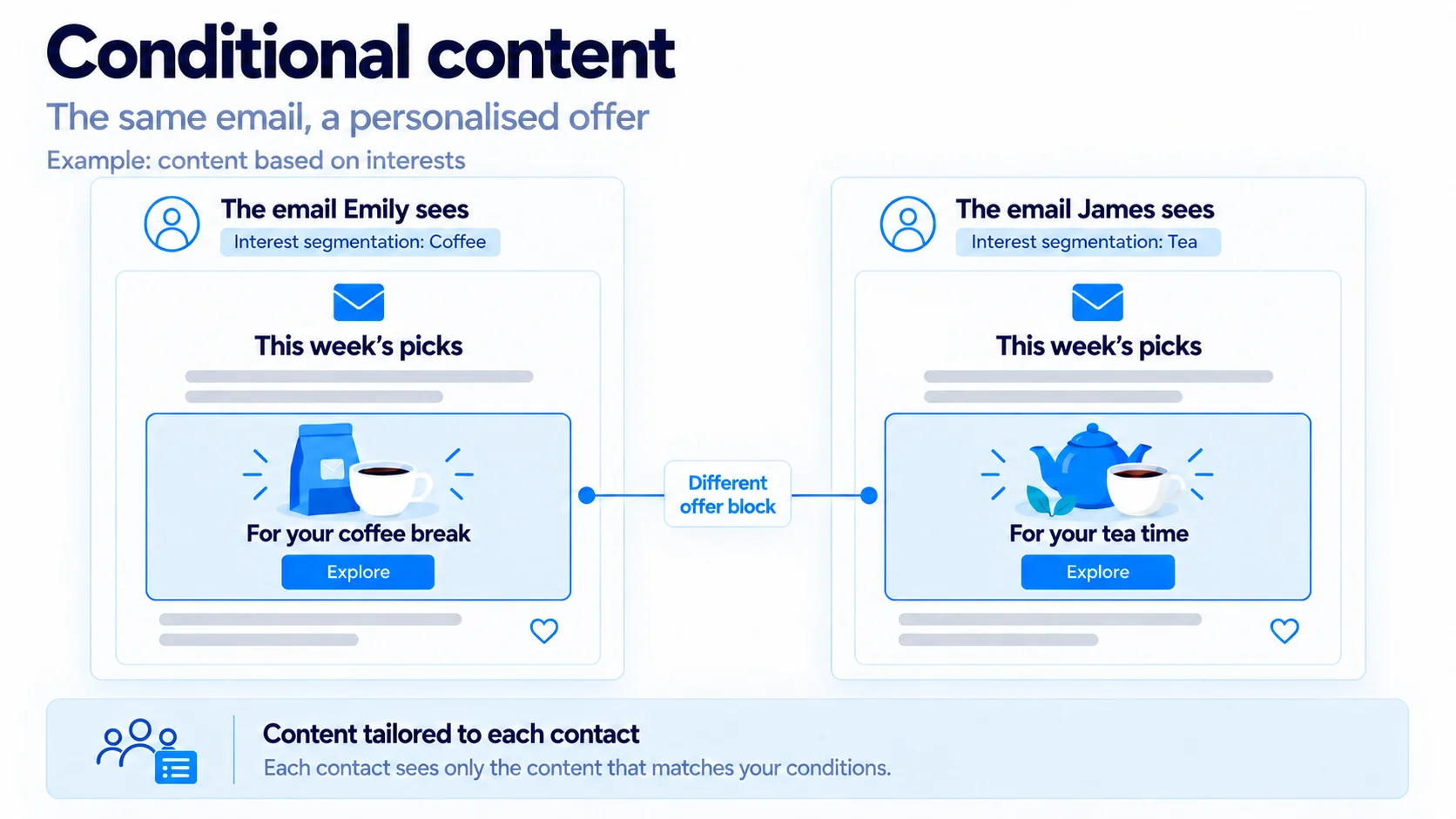
The result reads like two different emails, but you wrote, proofread and scheduled one. There is one subject line, one send time and one report.
Dynamic content, conditional content and dynamic email: what the terms mean
These three terms come up whenever email personalisation is discussed, and they do not all mean the same thing.
Dynamic content is the broad term. It covers anything that changes for each recipient, in an email or on a web page.
Conditional content is dynamic content controlled by a rule you set: show this row if the contact has the "Friend" tag, leave it out if not. The name varies between email tools. Mailchimp and MailerLite call the feature dynamic content, ActiveCampaign and Omnisend call it conditional content, and in MailGraf it is the Show to setting on a row.
Dynamic email means something else when Gmail uses the term. There, it is an interactive message built with AMP (originally Accelerated Mobile Pages, a web format Gmail also accepts inside email), such as a comment notification you can answer without leaving your inbox. Google's help page describes it. It needs a separate AMP version of the message. Marketing teams who say "dynamic email" almost always mean dynamic content.
Conditional content by segment: how one email serves two audiences
Conditional content is where segmentation and email personalisation meet. It works by attaching a rule to a row, and the rule is a question about the contact with a yes or no answer. Is this person a Friend? Does their record carry the "Family shows" tag? Is their country the United Kingdom?
A rule can look at four kinds of data:
- A contact field or custom field, such as country or membership level.
- A tag, such as "Friend" or "School group".
- A list the contact belongs to.
- A saved segment, which reuses a group you have already defined.
The segment option matters most. If you already send to a Friends segment, you do not rebuild that logic here. You point the row at the segment. What changes is the job the segment does: it no longer decides who receives the campaign, only what they see inside it.
The decision is made for each contact before sending. If the rule is not met, the row is removed from that person's copy completely. Nothing is hidden with styling, so there is nothing for an email app to reveal by mistake, and the message behaves the same in Gmail, Apple Mail and Outlook.
Personalised email marketing in practice: three examples
Personalised email marketing can sound like work for a large team with a data department. These three examples use data most organisations already hold, and each is a row or two in the theatre's season email.
Members and non-members in one newsletter
Near the top sits a row with a booking button. The theatre writes two versions of it.
Friends see: "Priority booking is open. Book before the general sale." Everyone outside that segment sees: "Friends book a week early. Join today." Every other row is shared, and no Friend is asked to join a scheme they already belong to.
A different video for each interest
The spring season includes a comedy tour and a family show, with a trailer for each. Sending both trailers to everyone makes the email twice as long. With dynamic content, each subscriber gets the trailer they are likely to watch.
Video cannot play inside an email, so a Video block in MailGraf shows the cover image with a play icon on top, and a click opens the video on its own page. Paste a YouTube, Vimeo or Loom link and the cover is fetched for you; Add a video block has the steps.
Each trailer gets its own row. The comedy row goes to subscribers who chose "Comedy" as a topic in the preference centre, the family row to those who chose "Family shows". Someone who chose both sees both. A third row with the general season trailer covers subscribers who chose neither, so nobody is left with a gap where the video should be.
A countdown with a different deadline for each segment
Deadlines are rarely the same for everyone. For Friends, priority booking closes on Friday at 6pm. For the general public, booking opens the following Monday at 10am.
A Countdown block shows the time left until a date as a running timer. The theatre puts one in the Friends row with Friday's deadline and another in the non-members row with Monday's opening time. Each block has its own end date, end time and time zone, so both groups see their own countdown in a single campaign. Add each countdown from the block list and set its date there, which keeps the two timers separate.
The timer is an image redrawn every time the email is opened, so it shows the time left at that moment. Outlook on Windows shows a still frame instead. Add a countdown timer block covers the settings.
One dynamic email or two campaigns?
Dynamic email content is not always the right answer. The deciding question is how much the two audiences share.
| What to compare | One email with conditional rows | Two separate email campaigns |
|---|---|---|
| Shared content | Most of it | Very little |
| Subject line and preview text | One for everyone | Written for each audience |
| Send time | One | Chosen for each audience |
| Report | One, covering the whole send | One per audience |
| Number of versions | Two or three | Four or more |
A rule of thumb helps. If you would copy the campaign and change one or two sections, use conditional rows. If you would change the subject line, the opening and the offer, send two campaigns to two segments.
A single report is usually an advantage, but it counts opens and clicks for the whole send. To compare versions, give each version's button its own link; the link figures then show which row earned the clicks. If the real question is which wording works better on one audience, that is a job for an A/B test, not for dynamic content.
What data to use for email personalisation in the UK
Email personalisation is only as good as the data behind it, and in the UK the data you may use is a legal question as well as a practical one. Three points from the direct marketing guidance of the ICO (Information Commissioner's Office, the UK's data protection regulator) are worth knowing before you write a rule.
Use what people told you. A topic ticked in a preference centre, a membership level or a postcode given at sign-up are facts the subscriber handed over. They are the safest basis for a rule. Our guide to consent management and email preference centres explains how to collect them.
Do not infer sensitive things. Health, religion, ethnic origin, political opinions and sexual life are special category data. The guidance warns that profiling people to target marketing can create this kind of data, for example by drawing conclusions about someone's health from other information, and says you should have explicit consent before using it. A rule such as "bought a gluten-free hamper, so show the coeliac support row" is the kind of inference it has in mind.
Respect objections. People have an absolute right to object to direct marketing, and under the UK GDPR that covers profiling carried out for it. An unsubscribe ends the emails. An objection to profiling means that person gets the plain version.
For lawful basis, consent and the soft opt-in, see our UK GDPR guide to email marketing. This section is practical guidance, not legal advice.
How to set up dynamic email content in MailGraf
In MailGraf the rule sits on the row, so the first step happens while you design: give each part that should vary a row of its own.
- Move the mouse over the row and click the Row label on its left edge. The panel on the left switches to the row's settings.
- Under Show to, change Everyone to Contacts matching a condition.
- Build the rule. Choose a contact field, a custom field, a tag, a list or a saved segment, then the condition and the value. Clicking the value box lists the values already stored in your account, which prevents a rule failing because of a typing slip.
- For a second version, add another row and give it the opposite rule.
A row takes one rule. To require two things at once, such as "is a Friend and lives in Scotland", create a segment with both rules and choose it for the row.
If a rule is left half finished, MailGraf will not send the campaign until you complete it or set the row back to Everyone. A half-built rule cannot send a row to the wrong people.
The help article Show email content by contact walks through each screen. Rows, the Video block and the Countdown block are all part of the email editor.
How to test a personalised email before you send it
Email personalisation multiplies the versions you have to check, so reading the email once is not enough. You need to see it as each kind of recipient.
In the editor, click Preview and pick a contact under View as. Choose a Friend first, then a non-member. The booking row should change and everything else should stay put. Then send a test email as each of them, so the copy in your inbox is built from their data.
One detail catches people out. A test sent without choosing a contact shows every row. That helps with proofreading, because all the wording is on one page, but it says nothing about whether the rules work.
Before you send dynamic content
- Have I previewed the email as someone who matches each rule?
- Have I previewed it as someone who matches none of them?
- Does a contact with an empty field still get a complete email?
- Does each version have a working button with its own link?
- Have I sent at least one test as a real contact?
Dynamic email content mistakes to avoid
- Rules that overlap. Anyone who matches two rules sees both rows. If the rows are alternatives, make the rules opposites: in the Friends segment, and not in it.
- No row for everyone else. If every version has a rule, people who match none of them get an email with a hole in it. Add a default row, or make one rule the opposite of the other.
- Out-of-date data. A row is only as accurate as the field behind it. A Friend whose membership lapsed in March, but whose record still says "Friend", gets the wrong row.
- Too many versions. Five audiences and four variable rows make twenty combinations to check. Start with one rule in one campaign.
- Personalising for its own sake. Email personalisation should change a row because the reader benefits. If both versions say roughly the same thing, send one.
FAQ
What is the difference between email personalisation and dynamic content?
Email personalisation is the aim: a message that fits the person reading it. Dynamic content is one way to get there, alongside merge tags, segmentation and automation. A merge tag changes a word, dynamic content changes a section, and segmentation changes who is on the send list.
Is dynamic email content the same as dynamic email in Gmail?
No. Dynamic email content is ordinary email with sections that vary by recipient, and it works in every email app. Gmail's dynamic email is an interactive format built with AMP that lets you act inside the message. It needs a separate AMP version.
What is the difference between segmentation and conditional content?
Segmentation decides who receives an email. Conditional content decides what each recipient sees inside it. One segment can do either job: you can send a campaign to it, or use it as the rule on a row.
Does conditional content work in Outlook?
Yes, when the decision is made before sending, as it is in MailGraf. Each contact receives a copy that already contains only their rows, so the email app has nothing to work out.
Can dynamic email content include different videos or countdown timers?
Yes. Put each video or countdown in its own row and set who sees that row. Each Countdown block keeps its own end date, so two segments can see two different deadlines in one campaign.
Originally published: Oct 8, 2026


Professional email marketing platform.

Don't miss out
Get the latest email marketing tips and exclusive updates.