Email Automation: How to Set Up Automated Email Flows
The businesses earning the most from email are not simply the ones sending the most email. Research presented in an NP Digital webinar covering 193 companies and 820 marketers found that among businesses above $51m in annual revenue, 71% run a balanced mix of automated and manual email, while only 11% lean mostly on campaigns (NP Digital webinar, 2026). Among businesses under $1m, that picture flips completely: 49% are still mostly sending campaigns by hand.
Email automation is the practice of sending emails triggered by a person's behaviour, their data, or a date, rather than by someone deciding to press send. Somebody joins your list and a welcome message arrives two minutes later. A shopper leaves items in a basket and a reminder follows that evening. A subscription approaches renewal and a notice goes out before it lapses.
This guide covers what email automation is, where the money in it actually sits, which flows are worth building first, and the technical and legal groundwork that decides whether any of it works. It is written for businesses in the United Kingdom first, but the mechanics and the compliance comparison apply wherever you send.
What is email automation?
Email automation is a set of rules that send emails on your behalf when a defined event happens. You build the rule once. It then runs for every contact who meets the condition, individually, for as long as you leave it switched on.
The event that starts it is called a trigger. A trigger can be an action the person takes, such as submitting a form or making a purchase. It can be a date, such as a renewal or a birthday. A hotel can use a guest's arrival date the same way, to send a pre-arrival email a few days before check-in. It can also be a change in their data, such as crossing a spend threshold or entering a segment.
What makes automation different from scheduling is who controls the timing. A scheduled email goes out at a moment you picked. An automated one fires at a moment the recipient created. That distinction sounds small and it changes almost everything about how the message performs, because relevance is mostly a function of timing.
The practical result is that one person might receive your welcome sequence today and another might start it in four months, and neither of them notices any effort on your part. That is the whole promise of automation: relevance at a scale that manual sending cannot reach.
Campaign vs email automation: two different machines
Most email programmes need both campaigns and email automation, and confusing the two is the fastest way to build the wrong thing. A campaign is a broadcast. An automation is a response.
| Campaign | Automation | |
|---|---|---|
| Shape | Campaign, send, repeat | Customer action, automated response |
| Who starts it | You, on your calendar | The contact, on theirs |
| Audience | A list or segment, all at once | One person at a time |
| Best for | Announcements, launches, sales, newsletters | Onboarding, recovery, retention, re-engagement |
| Effort profile | Recurring work every send | Front-loaded, then periodic review |
| Measured by | Per-send performance | Cumulative performance over time |
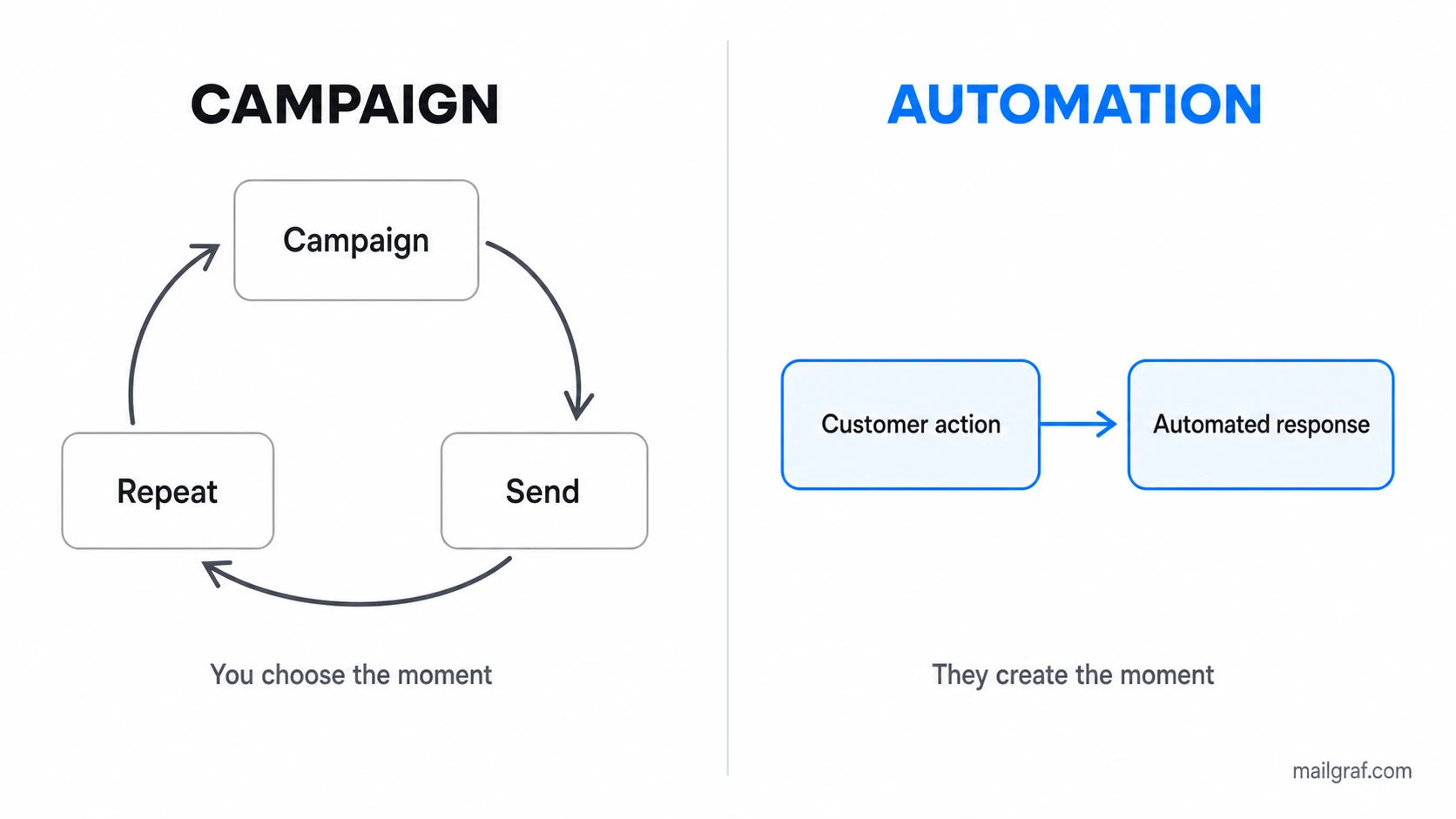
Campaigns are how you say something new. Automations are how you respond to something that happened. A product launch belongs in a campaign because the news is yours and the timing is yours. A basket reminder belongs in an automation because the trigger is theirs.
The effort profile is what changes your workload. A campaign requires a fresh decision and preparation each time you send it. An automation concentrates more work in the initial setup, then needs scheduled review as products, links, offers and customer behaviour change. That difference compounds quickly for small teams where one person handles marketing alongside everything else.
Neither replaces the other, which brings us to the most useful piece of data in this guide.
Where email automation revenue actually comes from
There is a common claim that email automation produces most of a business's email revenue. The real picture is more interesting, and more useful, than that.
The NP Digital research grouped businesses by annual revenue and asked where their email revenue came from. The pattern is a progression rather than a winner:
| Annual revenue | Mostly campaigns | Balanced mix | Mostly automation |
|---|---|---|---|
| Under $1m | 49% | 34% | 17% |
| $1m to $10m | 21% | 41% | 38% |
| $11m to $50m | 32% | 43% | 25% |
| $51m and above | 11% | 71% | 18% |
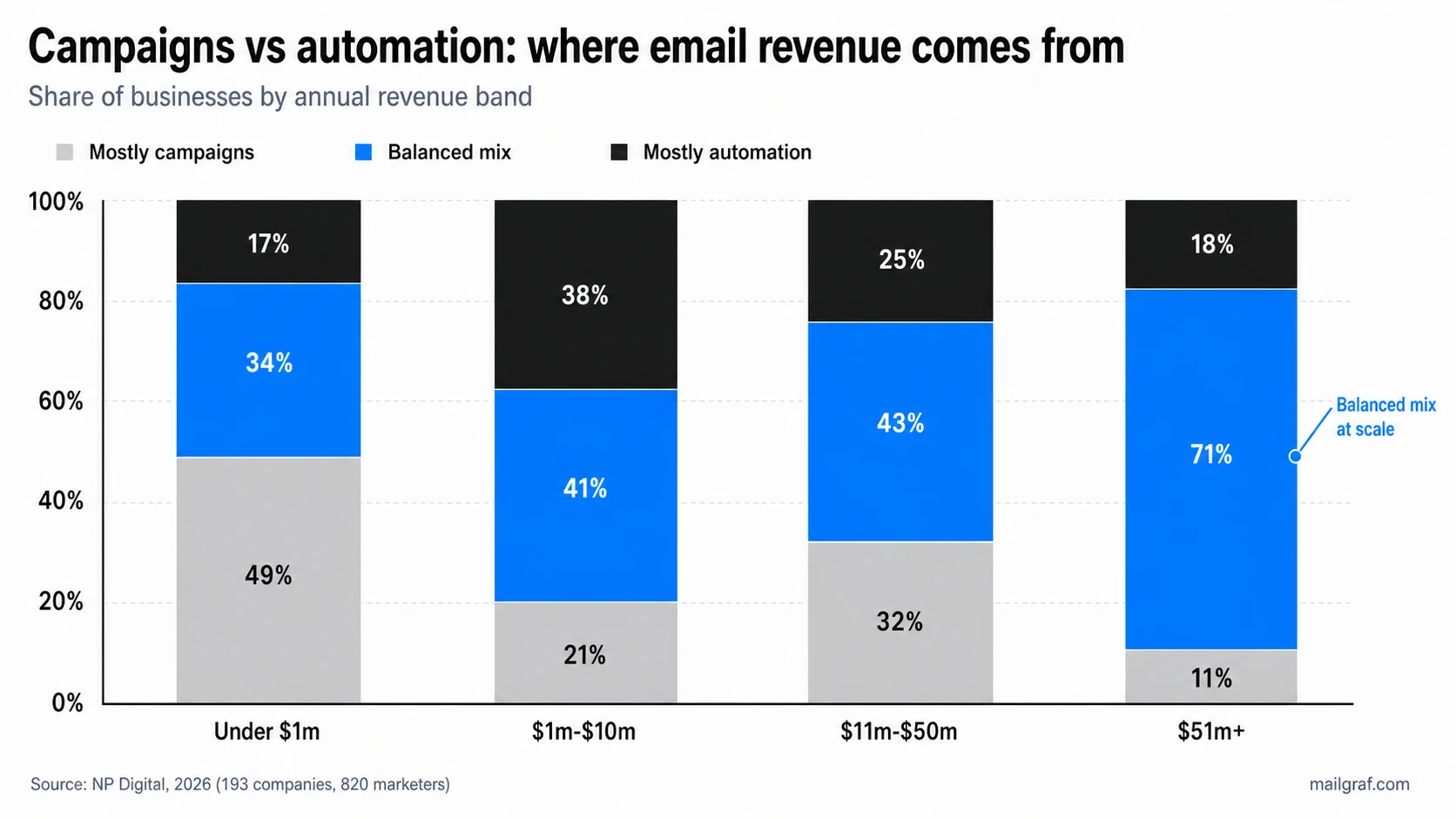
Read the balanced-mix column downwards. It climbs from 34% to 71% as businesses grow, while the mostly-campaigns column collapses from 49% to 11%. At no revenue level does "mostly automation" dominate.
The conclusion is not that email automation beats campaigns. It is that mature email programmes stop treating the choice as a choice. The businesses at the top are not the ones who automated everything, they are the ones who stopped sending everything by hand without abandoning campaigns altogether.
This matters for how you plan. If you are under £1m in revenue and sending everything manually, your opportunity is not to replace campaigns with automation. It is to move the repeatable, behaviour-driven messages into flows so that your manual effort goes into the campaigns that genuinely need a human decision.
Transactional, triggered and promotional: the three categories
Email automation is not one thing, and its three categories behave very differently in terms of consent, deliverability and expectation. Mixing them up causes both legal and technical problems.
| Category | What triggers it | Consent needed | Recipient expectation |
|---|---|---|---|
| Transactional | A completed action requiring a response | Generally not marketing consent | Actively waiting for it |
| Triggered | Behaviour or a data change | A valid basis or permission is usually required for marketing flows | Contextual, feels relevant |
| Promotional | Your calendar or a campaign rule | A valid basis or permission is required under the applicable rules | Tolerated if useful |
Transactional messages are order confirmations, password resets, receipts and shipping notices. The recipient is waiting for them, so they open at very high rates and rarely draw complaints. They also sit outside marketing consent rules in most jurisdictions, which is exactly why stuffing them with promotional content is a bad idea. Our transactional email guide covers where that line sits.
Triggered messages are the heart of automation: welcome sequences, basket recovery, replenishment reminders and re-engagement. Marketing flows generally need a valid lawful basis or permission appropriate to the recipient's jurisdiction. Existing-customer rules, such as the UK's soft opt-in, can change the exact basis, but not the need to document why the message is allowed.
Promotional automations are the grey area, such as birthday discounts or seasonal sequences. They are automated in delivery but promotional in nature, so they carry the same consent requirements and the same fatigue risk as any campaign.
Keep them separate in your platform. Adding promotional material to a service-critical message can change its legal treatment and the recipient's inbox expectation. Keeping promotional content in a separate marketing flow makes consent, opt-out and reporting rules much easier to apply correctly.
How an email automation is built
Every email automation builder uses the same handful of components, whatever the labels. A trigger starts the flow, a wait pauses it, and a condition splits the path based on data or behaviour.
The remaining two do the work at either end. An action sends the email or updates a record. An exit removes the contact once they reach the outcome you were aiming for.
The part most guides skip is where the trigger comes from. An automation cannot fire until somebody enters your list, and the quality of that entry point determines the quality of everything downstream. A form that captures an email address and nothing else gives you nothing to personalise with. A form that captures the person's interest or their reason for signing up gives you a condition you can branch on three emails later.
This is why signup capture and email automation belong in the same conversation rather than in separate projects. Pop-ups, landing pages and embedded forms are not just list-building tools, they are the trigger layer of every flow you will build afterwards.
For a worked example with full node tables, timings and split conditions across four different business models, see our welcome email series guide. It builds the same components into complete flows you can adapt.
If this is your first automation, start with one clear path: list signup, an immediate email, a two-day wait, one follow-up and an exit on unsubscribe or goal completion. Confirm the trigger and exit with test contacts before adding branches or more messages.
Which automations pull the most weight
Not all email automation returns the same amount for the same effort. The NP Digital research asked which automation generated the most revenue and produced a clear ranking:
| Automation | Share of automated revenue |
|---|---|
| Abandoned cart | 32% |
| Welcome series | 21% |
| Other | 17% |
| Post-purchase upsell or replenishment | 16% |
| Browse abandonment | 6% |
| Win-back or re-engagement | 5% |
| Educational series | 3% |
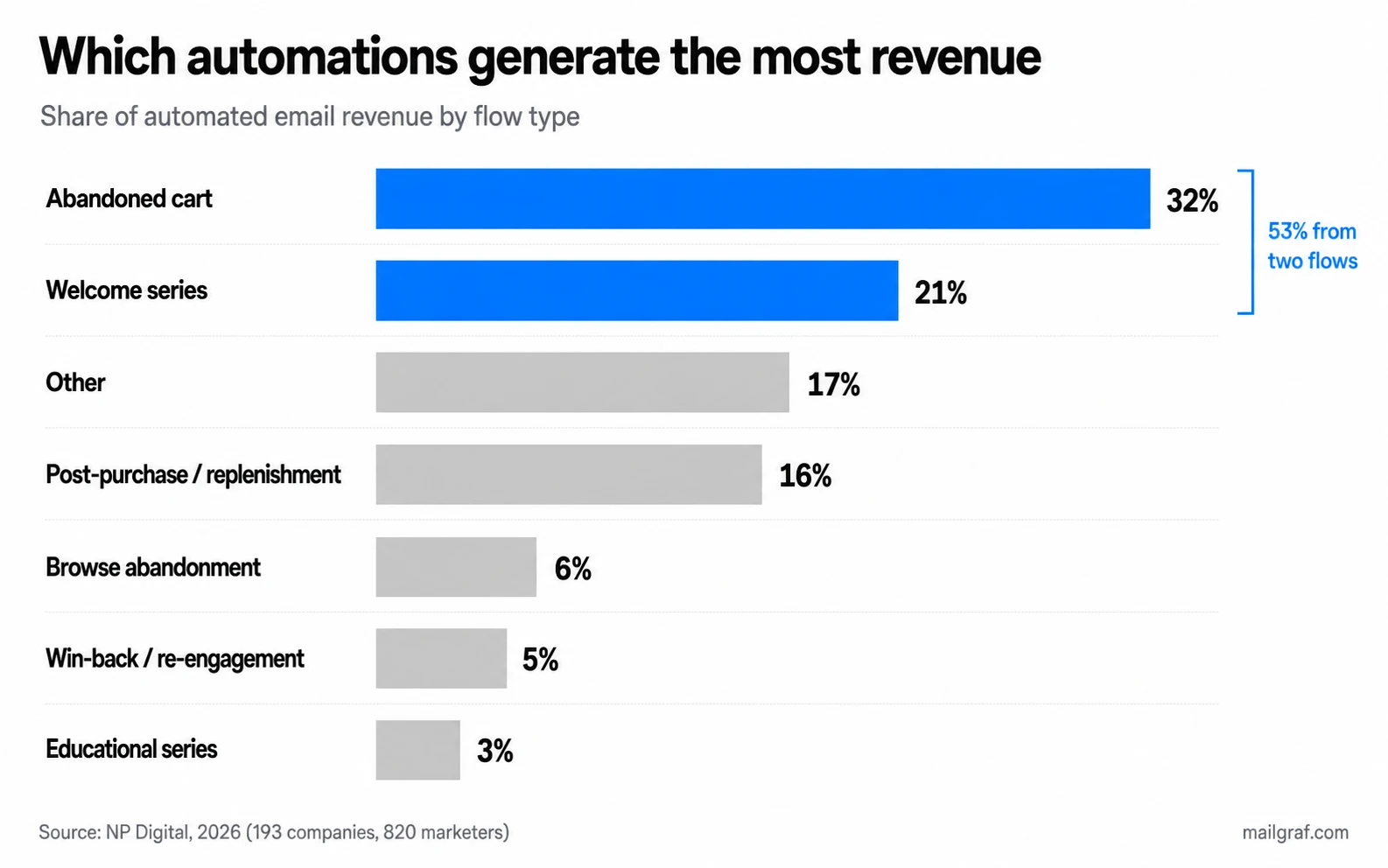
Two flows account for over half of all automated revenue. If you build nothing else, build a basket recovery flow and a welcome series.
That ranking is about revenue, not about value, and the distinction matters for non-retail businesses. A consultancy has no abandoned basket. An educational series that produces 3% of retail automated revenue might be the entire engine of a business that sells expertise. Read the table as a starting hypothesis for your model, not a rule.
Here is what each of the top five is actually trying to do:
| Automation | Goal | What makes it work |
|---|---|---|
| Welcome series | Build trust, drive a first purchase | Brand story, social proof, first-purchase incentive |
| Abandoned cart | Recover revenue that was nearly earned | Well-timed sends, dynamic incentives |
| Browse abandonment | Re-engage visitors who showed interest | Product reminders, category recommendations |
| Post-purchase | Increase repeat purchases | Cross-sell, replenishment timing, loyalty enrolment |
| Re-engagement | Reactivate dormant subscribers | Preference updates, win-back offers, clean exit |
Notice that re-engagement appears last on revenue but does something the others cannot. It decides who stays on your list. A win-back flow that ends by suppressing people who never respond is protecting your sender reputation, and that protection shows up as better performance across every other flow.
What order to build them in
Trying to launch five automations at once is how businesses end up with none of them live. Sequencing matters more than ambition, because each flow you finish makes the next one easier and gives you data you did not have before.
| Order | Build | Why here | Effort |
|---|---|---|---|
| 1 | Welcome series | Every business has new subscribers; no integration needed | Low |
| 2 | Abandoned cart or enquiry follow-up | Highest revenue return; needs store or form data | Medium |
| 3 | Post-purchase or post-enquiry | Uses data you now have; lifts repeat rate | Medium |
| 4 | Browse abandonment | Needs site tracking; refine after the basics work | High |
| 5 | Re-engagement | Needs engagement history to define dormancy | Low, but wait for data |
The welcome series comes first for a reason that has nothing to do with revenue ranking. It needs no integration, it applies to every business model, and it teaches you how your platform behaves before you attempt anything conditional.
Re-engagement comes last not because it is difficult but because it is meaningless early. You cannot define a dormant subscriber until you have enough sending history to know what active looks like on your list.
Give each flow a few weeks of real traffic before starting the next one. Launching them together means that when performance disappoints you will not know which one to blame.
Three things to sort out before you automate anything
An email automation is usually the first message a business sends without a human checking it first. That makes it the moment when every unnoticed setup problem becomes visible at once.
Authentication. SPF (Sender Policy Framework), DKIM (DomainKeys Identified Mail) and DMARC (Domain-based Message Authentication, Reporting and Conformance) are the three domain records that together tell mailbox providers you are permitted to send from your domain. If they are missing or published against the wrong subdomain, your automated emails compete for inbox placement carrying an unverified sender's handicap. You will conclude the flow failed when in fact it was never seen. Our guide to those three records covers each one, and the wider picture sits in our deliverability guide.
At MailGraf, the single most common problem we find when opening a new account is exactly this. Authentication entered incorrectly, or set against a subdomain that is not the one actually sending. We run a domain check before the first send on every account, because discovering it afterwards means discovering it after your first automated messages have already missed their audience.
Consent and entry points. An automation triggered by an unprotected form will faithfully email whatever a bot typed into it, and those addresses bounce. High bounce rates on your first automated send are a poor introduction to mailbox providers. Confirmed opt-in, a hidden honeypot field, or basic bot protection on every form prevents it. Our opt-in and consent guide covers what counts as valid permission.
Data you can branch on. A condition can only test data you actually hold. If your signup form captures nothing but an email address, every automation you build will be a straight line with no branches. Decide what one extra field would let you personalise, and capture it at signup rather than trying to backfill it later.
Consent and compliance: what the rules expect
Email automation does not change your legal obligations, but it does multiply them. A rule you set once will keep sending to everyone who matches it, long after you have stopped thinking about it, which makes getting the consent basis right more consequential than for a single campaign.
The requirements differ by where your recipients are, not by where your business is:
| Jurisdiction | Main rules | Consent model | Unsubscribe requirement |
|---|---|---|---|
| United Kingdom | PECR (Privacy and Electronic Communications Regulations) and UK GDPR | Opt-in, with a soft opt-in for existing customers | In every marketing message, honoured promptly |
| European Union | GDPR and ePrivacy | Opt-in, similar soft opt-in in most member states | In every marketing message |
| United States | CAN-SPAM (the federal commercial email law) | Opt-out permitted | Honoured within 10 business days |
| Canada | CASL (Canada's Anti-Spam Legislation) | Express or implied consent, implied consent expires | In every message, honoured within 10 days |
The gap that catches people out is between the opt-in world and the opt-out world. Much of the widely circulated advice on email automation is written for American senders, whose federal rules let you email someone who never asked as long as you make leaving easy. That approach is not lawful for recipients in the United Kingdom or the European Union, where you generally need permission before the first message.
For senders in Britain, the soft opt-in is the provision worth understanding properly. It allows you to market similar products to someone who bought from you and was given a clear chance to decline, without separate consent. It does not extend to people who merely enquired, and it does not cover unrelated products. Our UK GDPR guide goes through this in detail.
One practical rule covers most of it. Record where and when each contact gave permission, and keep that record attached to the contact. If an automation is still emailing someone three years after signup, that record is the only thing that answers the question of why.
Measuring email automation: why campaign metrics mislead you
Judging email automation with campaign metrics produces confident, wrong conclusions. A campaign is a single event with a single result. An automation is a system that produces results continuously, and the useful numbers are different.
| Metric | Why it matters for automation | What to do when it disappoints |
|---|---|---|
| Revenue per recipient | Compares flows of very different sizes fairly | Check offer clarity and exit rules |
| Goal completion rate | Shows how many contacts reach the purchase, activation or booking goal | Check the CTA, offer and exit event |
| Path progression | Shows where contacts stall after successful exits are removed | Inspect the condition and message before the stall |
| Time to conversion | Reveals whether your delays match the decision | Shorten or lengthen the waits |
| Entry rate | Tells you if the trigger is firing at all | Check the trigger condition and form |
| Unsubscribe by step | Isolates the message causing damage | Fix expectations set at signup |
| Revenue vs send volume | Catches flows sending a lot and earning little | Reduce frequency, tighten targeting |
Entry rate is the one people forget, and it fails silently. A flow with excellent open rates and almost no entries is a broken trigger, not a successful automation, and the dashboard will happily show you the flattering number.
Open rate deserves particular scepticism here. Automated emails benefit from contextual timing, but Apple Mail Privacy Protection can also record opens that do not represent deliberate reading. A strong open rate can suggest that delivery and timing are working; it does not prove that the email completed its job.
Compare each flow against your own campaign average rather than against published benchmarks from another industry. Your average is the only baseline that accounts for your list, your market and your offer. The definitions behind each metric are in our email marketing metrics guide.
Where AI helps and where it doesn't
Roughly 70% of companies still rely on basic personalisation such as inserting a first name, while only around 34% use predictive or behaviour-modelled personalisation (NP Digital, 2026). The gap is real, and so is the amount of noise about it.
Where it genuinely helps today:
- Send time optimisation per individual. Rather than sending every basket reminder two hours after abandonment, the send shifts to the hour that specific person usually opens email.
- Dynamic content blocks. The same email shows recently viewed products to one reader and a category introduction to another, without you building two emails. You can do a simpler version by hand with conditional content by segment.
- Predictive signals. Purchase likelihood, churn risk and expected lifetime value let a flow branch on what someone is about to do rather than only on what they have done.
Where it does not help:
- Deciding what the flow is for. No model will tell you whether your welcome series should sell or educate. That is a positioning decision.
- Consent and reputation. Predictive targeting on a list with no valid permission is a faster route to the same problem.
- Rescuing a broken setup. Personalisation applied to emails that land in spam changes nothing at all.
The honest summary is that these features narrow the gap between good email automation and very good email automation. They do not turn an absent automation into a working one. Build the flow first, then let the model refine the timing and the content. Our guide to AI in email marketing goes further into what is worth adopting now.
Setting up email automation in MailGraf
MailGraf's visual builder supports flows driven by list, tag, segment, website and email events. Welcome and re-engagement flows can be built from native audience events. Basket recovery and post-purchase flows require the relevant commerce integration or custom event source so MailGraf can receive the behaviour that starts and ends the flow.
The part that tends to matter more than people expect is the trigger layer. Under the Growth menu, MailGraf provides pop-ups, landing pages and shareable forms, and each of these can start an automation.
Each one catches a different kind of signup. A pop-up captures a visitor who was about to leave. A landing page gives a campaign or an advert somewhere to send people who want to subscribe. A shareable form goes out as a link, which is what you need when signups come from a conversation, an event or a partner rather than from your website.
This closes a loop that is usually left open. Most automation guides assume contacts somehow appear on your list and start the story from there. In practice the entry point decides both how many people enter your flows and what data you hold about them, which in turn decides how much you can personalise once they are inside.
MailGraf plans include different levels of support. Starter includes email support; Pro adds priority email and phone support. If you arrange additional setup support, use it to build and test your first automation. Our pricing page sets out what each plan includes, and the features overview covers the automation builder and the growth tools.
Common mistakes we see in new accounts
The problems that come up repeatedly when businesses build their first flows are rarely about writing.
No exit condition. A customer buys from the second email and then receives two more explaining why they should buy. It reads as careless, and it is a few seconds of work to prevent.
One trigger for every entry point. The checkout newsletter tick, the blog sidebar form and a gated download all feed the same flow, so everyone receives an identical first email regardless of what they asked for. Separate the triggers, or add a condition immediately after.
Automating a broken message. Automation multiplies whatever you put into it. A message that underperforms as a campaign will underperform thousands of times as a flow, quietly, with nobody watching.
Building all five at once. Launching a full suite in one week means that when results disappoint, you cannot tell which flow is responsible. Sequence them.
Never reviewing what is live. Prices change, linked pages start returning errors, discount codes expire. Walk through your own flows twice a year as a subscriber, on a phone, and see what people are actually receiving.
Frequently asked questions
What is the difference between email automation and a scheduled email?
A scheduled email leaves at a time you chose, reaching everyone on the list together. Email automation instead responds to a moment the recipient created through their own behaviour, one person at a time. Scheduling saves you from being at your desk; automation changes what the recipient experiences.
Which automation should I build first?
A welcome series, for almost every business. It requires no integration with other systems, it applies whether you sell products or services, and it teaches you how your platform handles triggers and delays before you attempt anything with conditions. Abandoned basket recovery is usually second, and returns more revenue.
How much email automation does a small business need?
Two well-built flows outperform six half-finished ones. A welcome series plus one recovery flow covers most of the available return for a small team. Add post-purchase and re-engagement once the first two have run long enough to produce useful data.
Does email automation need the same consent as a campaign?
Marketing messages need the valid basis or permission required in the recipient's jurisdiction, and the requirement is especially important because an automation keeps sending after you set it. Service-critical messages such as receipts and password resets are generally treated differently, but promotional content can change their legal treatment and should usually remain in a separate marketing flow.
Will email automation replace my regular campaigns?
No, and the data argues against trying. Among businesses above $51m in revenue, 71% run a balanced mix rather than leaning on either approach (NP Digital, 2026). Campaigns carry news that is yours to announce; automations respond to moments the customer creates.
How often should I review my automated flows?
Twice a year as a minimum, and immediately after any change to pricing, products or landing pages. Automations fail quietly because nobody is watching a send go out, so a flow can point at a dead page for months without anyone noticing.
Can I run email automation on a small list?
Yes. Email automation is about relevance and timing rather than volume, and a welcome series works identically whether you add ten subscribers a month or ten thousand. Small lists arguably benefit more, because the setup time is repaid over years rather than spent on every send.
Originally published: Aug 1, 2026


Professional email marketing platform.

Don't miss out
Get the latest email marketing tips and exclusive updates.