Consent Management and Email Preference Centres Under PECR
Consent management for email comes down to three questions about every address on your list. Are you allowed to send to it? How do you know? And what happens when that person changes their mind? An email preference centre is where the third question gets answered. It is the page a subscriber opens from your footer to pick topics, take a break, correct their details or stop your emails altogether.
In the UK, the rulebook is the Privacy and Electronic Communications Regulations (PECR), enforced by the Information Commission's Office (ICO), known until September 2026 as the Information Commissioner's Office. The sections below take the questions marketers ask most about PECR, answer them from the ICO's own guidance, and show where MailGraf keeps the records for you.
What does consent management mean for email?
The phrase covers two different jobs. One is the cookie banner on a website. The other is permission to send marketing emails, which is the subject here. PECR governs both, but a cookie tool does nothing for your mailing list.
For email, consent management means holding three things for each contact:
- The basis. Why you are allowed to email this person: they consented, or a soft opt-in applies.
- The proof. When and how that happened, in a form you can show if someone asks.
- The changes. Every opt-out, pause or change of topic since then. The latest choice always wins.
The tools get mixed up as well. This table separates them.
| Tool | What it does | Who sees it | Legal status in the UK |
|---|---|---|---|
| Cookie consent banner | Asks before tracking tools run on your website | Website visitors | Consent needed for most non-essential cookies |
| Unsubscribe link | Stops marketing emails to that address | Everyone you email | PECR requires a valid opt-out address; a clear link is a practical way to provide one |
| Unsubscribe page | Confirms the opt-out and may ask why | People who clicked unsubscribe | Optional; must not delay the opt-out |
| Email preference centre | Lets people choose topics, pause, fix their details or leave | Subscribers who follow the link in your footer | Optional; must preserve a simple way to unsubscribe |
What does PECR say about marketing email?
Two regulations do most of the work. Regulation 22 says you must not send unsolicited marketing email to an individual unless they have consented or a soft opt-in applies. Regulation 23 says every marketing email must show who it is from and give a valid address for opting out.
"Individual" is wider than it sounds. It covers consumers, and also sole traders and some partnerships. Limited companies and public bodies count as corporate subscribers. PECR lets you email them without consent, but you still have to say who you are and offer a way out.
Which rule you rely on depends on how the address reached you.
| How you got the address | What you rely on | Main conditions |
|---|---|---|
| Someone signed up for your newsletter | Consent | A clear, specific choice made by a positive action, with a record kept |
| A customer bought from you or asked for a quote | Products and services soft opt-in | You collected the address yourself, you only promote your own similar products, and you offered an opt-out at the time |
| A supporter donated to your charity or asked about its work | Charitable purposes soft opt-in | Charities only, for addresses collected on or after 5 February 2026, with an opt-out offered at the time |
| A contact at a limited company | No consent needed under PECR | You say who you are and give a valid opt-out address |
Whichever row applies, every marketing email you send afterwards has to carry a way to opt out.
PECR does not work alone. UK GDPR, the general data protection law, covers how you store and use the personal data behind each address. It also gives people an absolute right to object to direct marketing. Our UK GDPR email marketing guide covers that side in detail.
What did the Data (Use and Access) Act change?
The Data (Use and Access) Act 2025 changed PECR in two ways that matter for email. Both took effect on 5 February 2026.
The first is fines. The maximum penalty for a PECR breach used to be £500,000. The ICO can now fine up to £17.5 million or 4% of global turnover, the same ceiling as UK GDPR (ICO statement, February 2026). For years the lower cap made PECR look like the smaller risk. That gap has closed.
The second is charities. They gained a soft opt-in of their own, which is covered below.
What counts as consent under PECR?
PECR uses the UK GDPR standard. Consent must be freely given, specific and informed, and the person has to do something to give it. A pre-ticked box does not count. Neither does silence, or simply not objecting.
Three details catch senders out:
- Consent is specific. Agreeing to "marketing" in general is too vague. The person has to know what kind of messages they are agreeing to, and a yes to email does not stretch to text messages.
- Consent belongs to one address. If a customer gives you their work email, that says nothing about the personal address sitting in an old order.
- Consent needs a record. The ICO says you should keep who consented, when and how.
Double opt-in, where a new subscriber confirms through a link sent to their inbox, is not a legal requirement in the UK. It helps verify control of the address and records the confirmation, alongside the signup wording and other consent evidence. Our guide to opt-in and permission-based email compares the two methods.
In MailGraf, the record sits on each contact's profile. The Subscription and consent section shows the consent method, the source (a form, a file import or the API, for example) and the date. With double opt-in it also holds the time and IP address of the confirmation click. For form signups, the consent proof shows the signup page and the wording the person agreed to, where that was captured.
Newsletter signup forms always use double opt-in. The help article on consent status and confirmation records shows where each field lives.
When can you email without consent?
The soft opt-in is PECR's exception for people you already deal with. If someone bought from you, or got as far as asking for a quote, you may email them about your own similar products without asking for consent first. For a hotel, that covers guests who booked directly; our guide to email marketing for hotels shows where agency bookings differ.
The conditions are strict, and all five must hold:
- You collected the address yourself, directly from the person. A bought list never qualifies.
- They were buying, or actively asking about buying. Browsing your site is not enough.
- You only promote your own similar products and services.
- You gave them a simple way to opt out when you collected the address.
- You give them a way to opt out in every message afterwards.
Picture a garden centre that takes an email address at the till and shows an opt-out box on the same screen. It can email that customer about plants and tools. It cannot send them a partner's insurance offer. It also cannot add the opt-out later, in the order confirmation. The choice has to be there at the moment of collection.
The charitable purposes soft opt-in
Before February 2026, the soft opt-in did not cover fundraising. A charity could use it to promote its online shop, but not to ask a past donor for another gift.
Since 5 February 2026, a charity can email people who supported it, or showed interest in its work, as long as the only purpose is to further its charitable purposes. It applies only to contact details collected on or after that date. A donor from 2025 is not covered until they give their details again and are offered the opt-out. The ICO's guidance on electronic mail marketing gives worked examples.
A charity that also sells things may be using both soft opt-ins at once. In that case the ICO expects a separate opt-out for each type of marketing, both at collection and in every later message. It suggests a simple set of flags or preference fields to keep track of who can receive what.
What does a compliant unsubscribe look like?
Every marketing email needs a way out. PECR requires a valid address for opting out, and the ICO expects the route to be easy. Its guidance comes down to four tests.
It is in every message. Not only the first one, and not only the newsletter.
It is simple. A reply or a clear unsubscribe link is enough. The ICO is blunt about the common workaround: making people log in or create an account to change their preferences "is not a simple way to opt out".
It is free. No premium-rate number and no fee.
It works straight away. PECR does not give a number of days. The ICO expects you to act promptly, and to stop immediately or as soon as possible when consent is withdrawn. Mailbox providers are more specific. Google expects one-click unsubscribe requests to be honoured within 48 hours (Google, Email subscription guidelines for senders).
What happens after the click matters just as much:
- Suppress, do not delete. A deleted address can come straight back in the next import. The ICO recommends keeping a suppression list that holds just enough to recognise the address and block it (ICO, Respect people's preferences).
- Do not ask them to confirm. You may send one message saying the opt-out worked and how to come back. It must not ask the person to do anything more.
- Do not ask them back. Once someone has objected, you cannot email later to ask whether they have changed their mind. A win-back email to unsubscribers is itself marketing.
In MailGraf, a missing unsubscribe link is caught before you send. The Content checklist flags it, and the Deliverability & compliance card on the review step confirms it. Every campaign email also carries the one-click unsubscribe header that Gmail and Yahoo require from bulk senders.
Unsubscribed and blocked contacts are always skipped, and a file import does not reactivate them. Forget contact deletes the personal data but keeps a non-readable record, so the address stays blocked if it is ever added again. If someone asks to come back, Send resubscribe email sends them a confirmation link. Nothing changes until they click it.
Where does an email preference centre fit?
An unsubscribe link offers one choice: everything or nothing. Plenty of people who click it do not want nothing. They want fewer emails, or the events without the offers, or a quiet month while they are away.
An email preference centre gives those people somewhere to go. It is a page, reached from a link in your footer, where a subscriber can see what they receive and change it. PECR does not require one. What the rules do require is that the way out stays simple, and an email preference centre has to respect that.
So can the unsubscribe link lead to an email preference centre? ICO guidance does not mention a page between the click and the opt-out, so its general test applies. Our reading is this. If the person can leave from that page in one step, with no login and no other options to work through first, the opt-out is still simple. If they have to sign in, hunt for the right box or untick ten topics one by one, it is not.
Two more points from the ICO shape how the page should behave. An opt-out covers what your wording says it covers, so "no" to one topic is not an objection to everything, and the page should say so plainly. And the most recent choice is the one that counts, whichever direction it goes.
In MailGraf, new email designs put two links side by side in the footer: Update my profile and Unsubscribe. Each contact reaches the page through their own link, so nobody logs in. The unsubscribe page suggests a break first, but Unsubscribe sits on the same page and takes one click. The unsubscribe button that Gmail shows in the inbox removes the person at once, without opening any page.
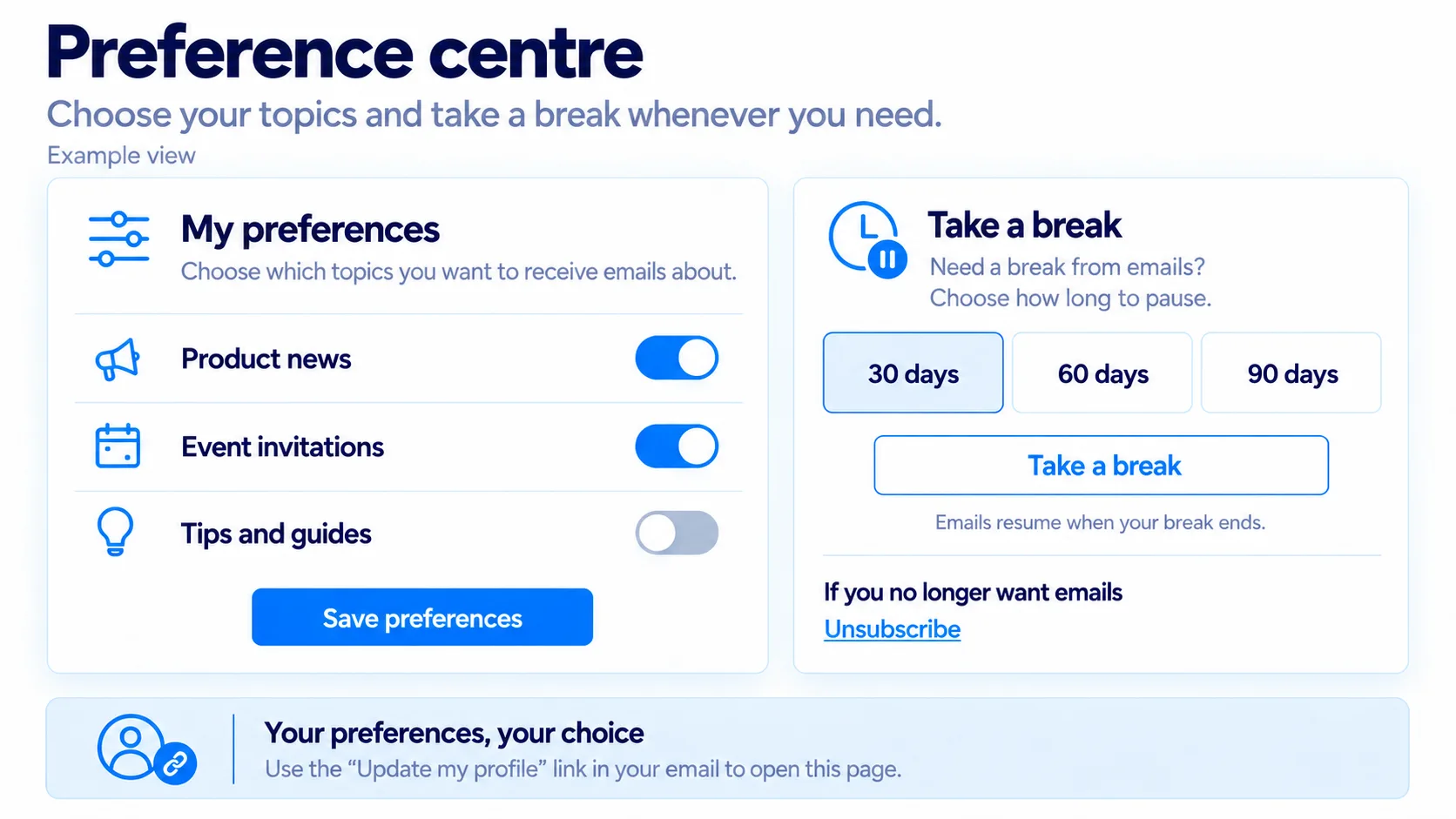
What should an email preference centre offer?
Four things cover most senders. More than that, and the page starts to look like a form nobody wants to fill in.
Topics. Group your emails the way a subscriber would describe them: product news, event invitations, offers. Plain names beat internal ones. "Offers" tells people what they will get. "Promo list B" does not. The answers are also the raw material for email personalisation: one newsletter can show each subscriber the section that matches the topics they picked.
A break. Some people are not leaving, they are busy. A pause of a month or two keeps them on your list without filling their inbox. A break is not an opt-out, so the unsubscribe option stays next to it.
Their details. UK GDPR gives people the right to have inaccurate data corrected. Letting them fix a misspelt name or move to a new address themselves meets that right without a support ticket.
Unsubscribe from everything. Always visible, never the last item behind a scroll.
One rule sits underneath all four: a preference nobody answered is not a yes. Where a topic rests on consent, send it only to people whose consent covers it and who have not since opted out. Where it rests on a soft opt-in, first check that each contact meets all its conditions, then exclude anyone who opted out of that topic or all marketing emails. Not set is not proof of consent or soft opt-in eligibility.
It also pays to offer only what you can deliver. A "weekly digest" option is a promise to build a weekly digest.
In MailGraf, you can define up to 20 preferences, group them and decide which ones appear on the page. Each answer is stored as Yes, No or Not set. Hidden preferences stay out of sight but still work in segments, which suits something like a press list.
Contacts can pause emails for 30, 60 or 90 days. Campaigns skip them during the break, missed campaigns are not sent afterwards, and only the contact can end the break early. If you allow it in the page settings, they can also correct their name or email address. A new address takes effect only after they confirm it.
For setup steps and availability, see Manage email preferences and Compare plan allowances.
Do preferences change who you send to?
Only if you use them. An email preference centre earns its place when the answers reach your sending. Asking people what they want and then sending everything to everyone is worse than never asking, because now they know you were told.
A preference does not filter your campaigns by itself. You choose the audience each time. To invite only the people who asked for events, send to a segment where "Event invitations" is Yes. Our email segmentation guide covers how to build audiences like this.
Keep a trail as well. When a subscriber asks why they received something, you need to see what they chose and when. In MailGraf, the Preferences tab on a contact's profile shows each answer. It also shows where the answer came from: the contact, a member of your team, a form, an import or the API.
One boundary is worth knowing. Order confirmations, invoices and password resets are service messages, not marketing, so they do not belong in an email preference centre and they do not stop when someone unsubscribes. The ICO treats a service message that carries promotional content as direct marketing, though. Add a discount code to a delivery update and the marketing rules apply to it. Our transactional email guide explains where the line sits.
Common mistakes
Most of the rules above are easy to follow once you know them. Three slips happen even to careful teams.
- Hiding the unsubscribe. Grey text in a tiny font pushes people towards the spam button instead. A spam complaint hurts your sender reputation far more than an opt-out does.
- Asking why before the opt-out goes through. Ask afterwards, and make it optional. MailGraf shows the reason question only once the person is already unsubscribed.
- Letting another system overwrite an opt-out. If your shop or CRM (customer relationship management) tool re-sends its full customer list, an unsubscribed address can come back as active. It is worth checking what each import and integration does with those addresses.
Before your next campaign
- Can I say, for each list, whether it rests on consent or a soft opt-in?
- Could I show when and how a given contact agreed?
- Does every marketing email carry an unsubscribe link that works without a login?
- Do unsubscribed addresses stay blocked when I import a new file?
- If I offer topics, does each one have a segment I actually send to?
If you would like to try the page your subscribers would see, the preference centre feature page has a working example you can click through.
Frequently asked questions
Is an email preference centre a legal requirement in the UK?
No. PECR requires a valid opt-out address in every marketing email, and the ICO expects opting out to be simple and free. An email preference centre is an optional extra that gives people choices short of leaving. It must preserve a simple way to unsubscribe.
Do marketing emails need an unsubscribe link in the UK?
Every marketing email needs a valid opt-out address, but PECR does not prescribe a hyperlink as the only method. A monitored reply address can provide a way to opt out; a clear unsubscribe link is usually easier for subscribers. MailGraf provides an unsubscribe link and one-click unsubscribe headers. Mailbox providers have their own requirements in addition to PECR.
How quickly must I act on an unsubscribe?
Act without delay and aim to stop marketing immediately. The ICO says that when consent is withdrawn, the marketing it covers must stop immediately or as soon as possible. Google's separate 48-hour requirement is not a legal grace period or permission to keep sending for two days.
Is double opt-in required under PECR?
No. The law asks for valid consent and evidence of it, not for a particular method. A confirmation link is a dependable way to get that evidence, which is why MailGraf uses it on newsletter signup forms.
Can I email someone who unsubscribed to ask them back?
No. That message would be the very marketing they objected to. The ICO allows one narrow exception: a short line on how to update preferences, added to a message you were sending anyway, such as an order confirmation. It must not encourage them to return.
Does PECR apply to B2B email?
Yes, but the rules differ by subscriber type. The prior-consent rule protects individuals, including sole traders and some partnerships. Marketing emails to corporate subscribers, such as limited companies and public bodies, do not require prior consent under PECR, but the identity and opt-out rules still apply. Where a business email address identifies a person, UK GDPR also applies: you need a lawful basis for using their data and must respect their right to object to direct marketing.
Is email consent management the same as a cookie banner?
No. A cookie banner manages permission for tracking tools on your website. Email consent management covers permission to send marketing emails, the proof of that permission and every later change. Both come under PECR, but one does not cover the other.
Does saying no to one topic count as unsubscribing?
Not if your wording is clear. An opt-out covers what you said it covers. Someone who switches off offers but keeps event invitations has narrowed what they receive. They have not objected to everything, and the option to unsubscribe from all emails should stay on the same page.
Originally published: Oct 4, 2026


Professional email marketing platform.

Don't miss out
Get the latest email marketing tips and exclusive updates.