Welcome Email Series: Automation Flows That Convert
A new subscriber is rarely more interested in your business than in the first hour after they sign up. Welcome emails consistently sit among a brand's highest-engagement messages. GetResponse's Email Marketing Benchmarks show why the format deserves attention, although open data should be read cautiously because Apple Mail Privacy Protection can inflate it. Most businesses answer that moment with a single line of text and never write to the person again.
A welcome email series is a short sequence of automated emails, usually three to five, sent to someone who has just joined your list. The first message goes out within minutes of signup. The rest follow over the next few days, each with one job: introduce the brand, prove it is worth staying subscribed, and move the reader towards a first purchase or first meaningful action.
The gap between a single greeting and a proper welcome email series is where much of the missed opportunity sits. This guide is not a gallery of pretty examples. It shows you the node structure behind the automation, then gives you four complete flows built for four different business models, with triggers, wait times, split conditions and exit rules you can adapt in your own builder.
What a welcome email series actually is, and what it isn't
A welcome email series is a triggered automation. It starts when a specific event happens, it runs on its own schedule, and it stops when the subscriber reaches a defined outcome. Nobody presses send. That is the whole point.
This makes it fundamentally different from the newsletter you send on Thursdays. A campaign goes to everyone at once, on your calendar. A welcome flow goes to one person at a time, on their calendar, starting from the moment they raised their hand.
It is also different from a transactional email. An order confirmation or a password reset is a system response to an action, and its job is to deliver information the recipient is waiting for. The lines blur in practice, and a greeting message often carries both jobs at once. Our guide to transactional email covers where that boundary sits and why it matters for consent.
Three things a welcome email series is not:
- A discount coupon with a greeting attached. The discount is one tactic inside one flow type. Plenty of strong sequences never mention price at all.
- A brand story with no purpose. If the reader finishes the sequence without a clear next step, the automation is decoration.
- Something you write once and forget. Subscriber behaviour changes, offers change, and a flow nobody has reviewed in two years is quietly damaging your sender reputation.
The reason a welcome email series beats a single message is simple. One email has to introduce the brand, set expectations, prove credibility and drive an action, all at once. Split those jobs across four emails and each one gets to be short, focused and genuinely useful.
Anatomy of a welcome email series: the five node types
Every automation builder on the market, whatever it calls them, works with the same five building blocks. Learn these once and you can read or build a flow in any tool.
| Node type | What it does | Typical use in a welcome flow |
|---|---|---|
| Trigger | Starts the flow for one contact | Signup form submitted, account created, first order placed |
| Delay | Pauses the flow for a set time | Wait 48 hours before email 2 |
| Condition | Splits the path based on data or behaviour | Did they click, activate or buy? |
| Action | Does something | Send an email, add a tag, update a field |
| Exit | Removes the contact from the flow | Order placed, moved to customer list, unsubscribed |
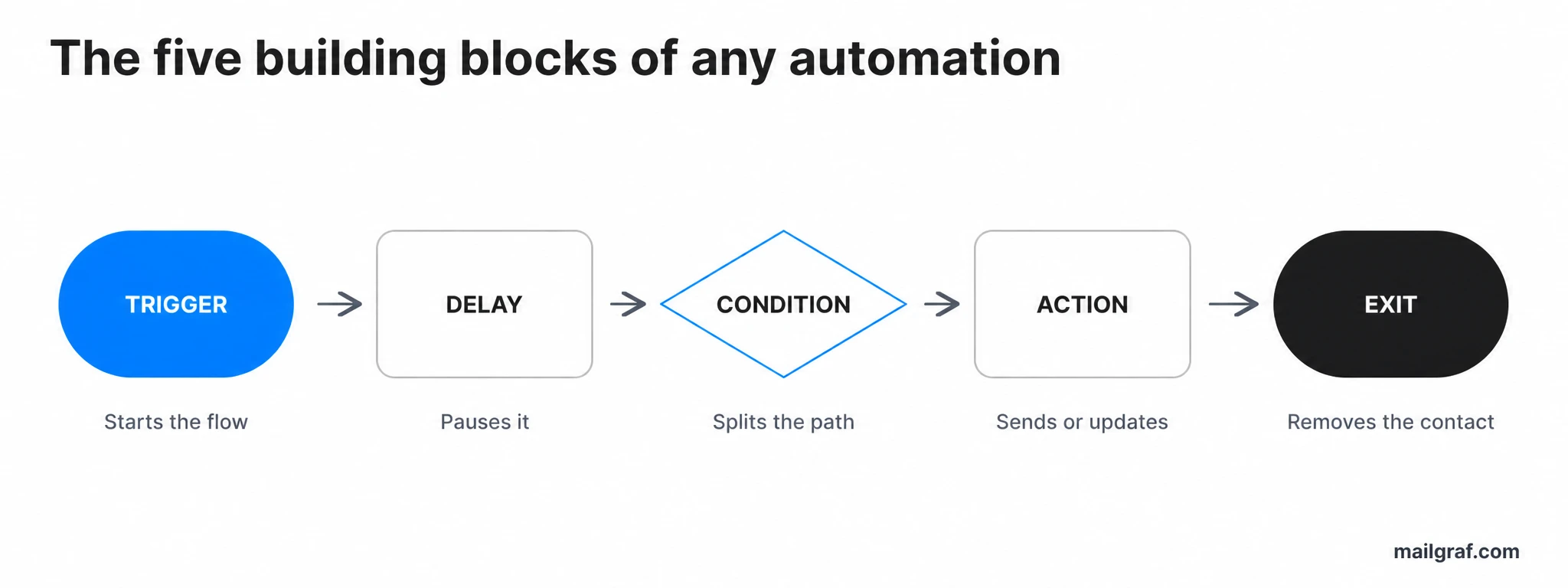
The trigger is where most flows go wrong. "Joined the list" sounds precise until you have four signup sources feeding one list, at which point a person downloading a technical guide gets the same first email as someone who just asked for a discount code. Separate triggers, or a condition immediately after the trigger, solve this.
Delays deserve more thought than they usually get. The gap between emails does more than pace the sequence, it changes how the sequence feels. Two emails twelve hours apart read as eager; four days apart read as considered. Match the rhythm to the purchase cycle, not to a template you found online.
Conditions are what separate a real automation from a scheduled newsletter with extra steps. A single condition after the first email can split contacts who completed a meaningful action from those who did not. Prefer clicks, purchases or product events when they are available; open-based branches are less reliable because privacy features can record an open without a person reading the message.
The exit node is the one people forget, and forgetting it is expensive. If someone buys after email two, they must stop receiving "here is why you should try us" messages. Nothing damages trust faster than being sold something you already own.
Written as a single line, a basic welcome email series looks like this:
Signup → Email 1 (immediate) → wait 48h → clicked or completed the goal? → yes: Email 2a / no: Email 2b → wait 72h → Email 3 → exit on order
Everything that follows is a variation on that shape.
If this is your first flow, start smaller: signup, one immediate email, a two-day delay, one follow-up and an exit on unsubscribe or conversion. Publish that version, confirm the trigger and exit work, then add conditions only when you have enough behaviour data to use them well.
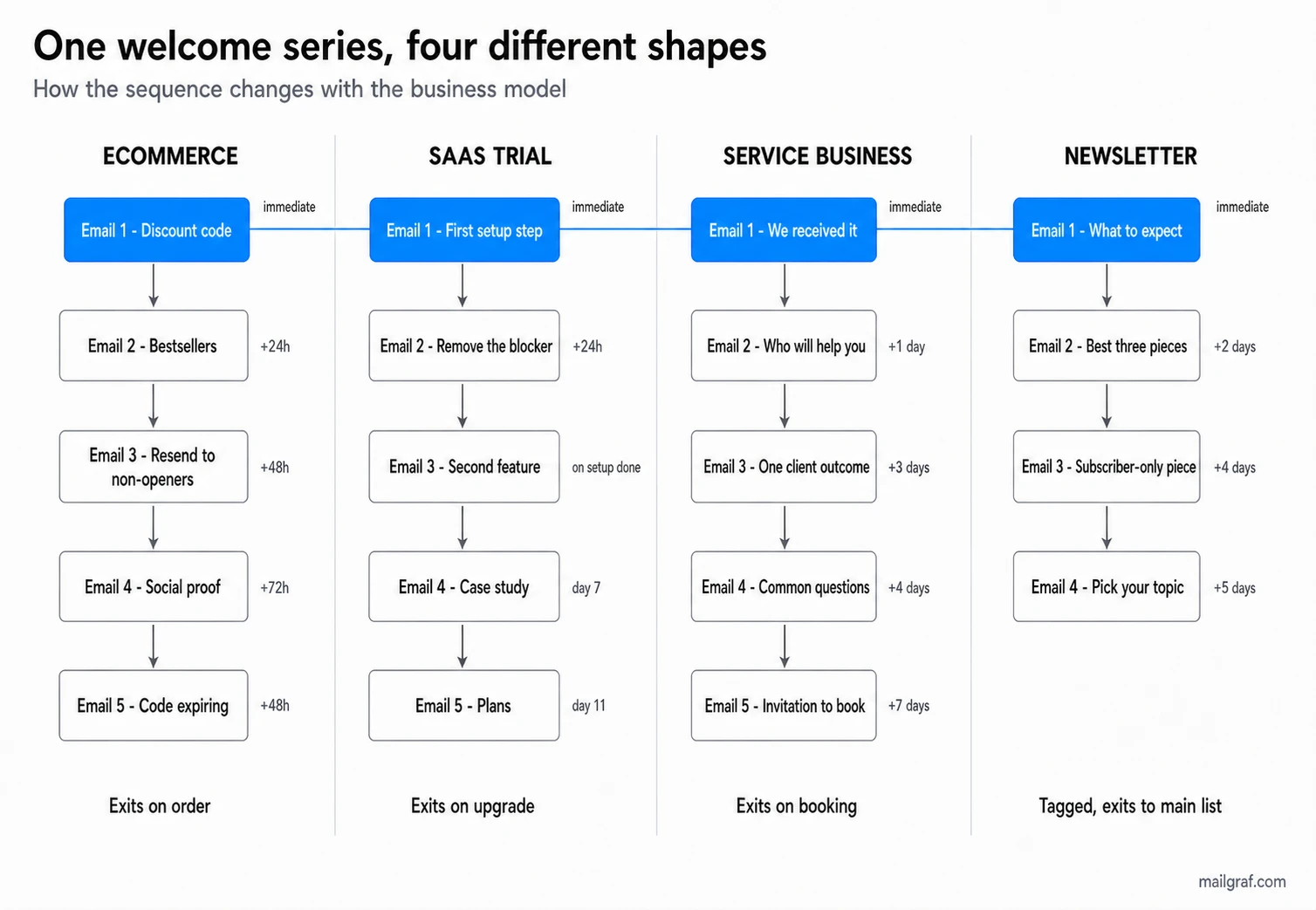
Flow 1: ecommerce and direct-to-consumer
This is the flow most guides describe, because it is the one where the money shows up fastest. Someone lands on your site, a popup offers a discount for their email address, and they take it. Their intent is high and their memory of you is short, so the sequence has to move.
| Step | Trigger or wait | Email job | Main CTA | Exits when |
|---|---|---|---|---|
| 1 | Signup, immediate | Deliver the promised code, confirm it works | Shop now | Order placed |
| 2 | Wait 24h | Bestsellers and what makes the product different | Browse category | Order placed |
| 3 | Wait 48h, if there is no click or purchase | Present the value from a different angle | Shop now | Order placed |
| 4 | Wait 72h | Social proof: reviews, customer photos, press | Read reviews | Order placed |
| 5 | Wait 48h, code expiring | Final reminder with a deadline | Use code | Order or flow end |
Signup → Email 1 (code, immediate) → wait 24h → Email 2 (bestsellers) → engaged? → no: Email 3 (resend) → wait 72h → Email 4 (proof) → wait 48h → Email 5 (expiry) → exit on order
The single most important design decision in this welcome email series is the deadline on the discount. A code with no expiry gives the reader permission to decide later, and later usually means never. Seven days is a common window, long enough to feel fair and short enough to create movement.
Email three is the step most brands skip, and it is often the cheapest win available. A subscriber who has not clicked or purchased is not necessarily uninterested; they may have been busy or the first angle may not have landed. Use a different subject line and a sharper reason to act rather than blindly resending the same message. If open data is your only signal, treat it as directional rather than definitive.
Watch the interaction with your abandoned browse and abandoned cart automations. If a subscriber triggers all three at once, they can receive four emails in two days, which reads as harassment. Set a rule that suppresses promotional automations while someone is inside the welcome flow.
Flow 2: B2B SaaS free trial
Here the discount-led structure fails completely. Your new contact has not bought anything, they have started a trial with a fixed clock running, and the thing that decides whether they convert is whether they reach a moment of real value before that clock stops.
The goal of this welcome email series is activation, not persuasion. Every message should push towards one specific action inside the product.
| Step | Fires on | Purpose of the message | Action asked | Removed when |
|---|---|---|---|---|
| 1 | Trial started, immediate | Confirm access, name the single first step | Complete setup | Setup done |
| 2 | 24h later, if setup unfinished | Remove the blocker, offer a hand | Book 15 minutes | Setup done |
| 3 | Setup completed | Show the second core feature | Try the feature | Feature used |
| 4 | Day 7 of trial | Case study from a similar business | Read the story | Upgraded |
| 5 | Day 11, trial ending | Plans, and what happens to their data | Choose a plan | Upgraded |
Trial start → Email 1 (first step) → wait 24h → setup done? → no: Email 2 (unblock) / yes: Email 3 (feature 2) → day 7 → Email 4 (case study) → day 11 → Email 5 (plans) → exit on upgrade
Notice that steps two and three are driven by a product event, not a timer. This is what makes a software trial sequence harder to build and much more effective when it works. A contact who finished setup on day one should not receive a "having trouble getting started?" email on day two.
The offer of a short call in email two does more work than any feature list. Trials fail on the first blocker, and the businesses that convert best are usually the ones that put a human in front of that blocker quickly. If a call is not realistic at your volume, a link to a two minute video of the exact setup step is the next best thing.
Keep the pricing conversation out of the first four emails. Bringing it up before the product has proven itself invites a comparison you have not yet earned the right to win.
Flow 3: service business, agency or clinic
A dental practice, a marketing agency and a legal consultancy have more in common than they think. In all three, the new contact is not buying a product, they are deciding whether to trust a person with something that matters. Nothing about the ecommerce structure applies here.
The enquiry itself is the trigger, and the currency is credibility rather than discount.
| Step | Timing | Message goal | Button | Stops when |
|---|---|---|---|---|
| 1 | Enquiry received, immediate | Confirm arrival, say when a human will reply | Reply to this email | Booking made |
| 2 | One day later | Introduce the person who will handle it | View profile | Booking made |
| 3 | Three days later | One client outcome, told properly | Read the story | Booking made |
| 4 | Four days later | Answer the three questions people always ask | See the answers | Booking made |
| 5 | One week later | Direct, low-pressure invitation to book | Book a call | Booking or flow end |
Enquiry → Email 1 (acknowledge, immediate) → wait 24h → Email 2 (who you'll work with) → wait 3d → Email 3 (one outcome) → wait 4d → Email 4 (objections) → wait 7d → Email 5 (invite) → exit on booking
Email one is the highest-value message in this entire welcome email series and it takes ten minutes to write. Telling someone "Ayşe will come back to you before 5pm tomorrow" removes the anxiety of silence, which is the main reason enquiries go cold and get sent to three competitors instead.
The spacing here is deliberately slower than the ecommerce version. Service decisions involve other people, budgets and internal conversations. Emails two days apart feel like pressure; a week feels like patience.
Resist the urge to put three case studies in email three. One story, with the real problem, the real approach and the real result, is far more persuasive than a list of logos. The principle of writing for one specific reader, covered in our email marketing strategy guide, applies directly here.
Flow 4: newsletter and publisher
If you have no product to sell yet, the welcome email series has one job: turn a curious subscriber into a habitual reader. Everything else follows from that.
This is also the flow where sending a discount would be actively strange, which makes it a useful test of whether you have understood the format.
| Step | Timing | Message goal | Ask | Ends when |
|---|---|---|---|---|
| 1 | Subscribe, immediate | What you write about, how often, from whom | Reply with your biggest question | Runs to the end |
| 2 | Two days later | Your three best pieces, with a reason for each | Read the first one | Runs to the end |
| 3 | Four days later | A short original piece, subscribers only | Read it now | Runs to the end |
| 4 | Five days later | Ask one question to segment interest | Pick a topic | Tagged, then exits |
Subscribe → Email 1 (expectations, immediate) → wait 2d → Email 2 (best of) → wait 4d → Email 3 (exclusive) → wait 5d → Email 4 (preference question) → tag → exit to main list
Email one should state the sending frequency in plain words and then keep that promise. "Once a fortnight, on Tuesdays" sets a contract. Breaking it is the fastest route to spam complaints, and complaints from your newest subscribers do disproportionate damage to your sender reputation.
The final message is doing quiet strategic work. Asking which of three topics someone cares about, and tagging them accordingly, means every campaign you send afterwards can be targeted. That single question often lifts long-term engagement more than the previous three emails combined, and it feeds directly into email segmentation.
Asking for a reply in email one is not a gimmick. Replies are a positive engagement signal to mailbox providers, and for a new sending domain that early signal is genuinely valuable.
Welcome email series timing: how long to wait between emails
There is no universal correct gap, but there is a correct method for finding yours. Match the rhythm of the sequence to the length of the decision it supports.
| Business type | First email | Gap to the second | Typical total span | Series length |
|---|---|---|---|---|
| Ecommerce, low price | Immediate | 24 hours | 5 to 8 days | 4 to 5 emails |
| Ecommerce, high value | Immediate | 48 hours | 10 to 14 days | 4 to 5 emails |
| Software trial | Immediate | 24 hours | Length of the trial | 4 to 6 emails |
| Service or B2B | Immediate | 24 hours | 14 to 21 days | 4 to 5 emails |
| Newsletter | Immediate | 2 days | 10 to 14 days | 3 to 4 emails |
The first email is immediate in every single row, and that repetition is deliberate. Attention decays sharply after signup, and a greeting that arrives the next morning has already lost most of its advantage over a normal campaign.
"Immediate" should mean within a few minutes. Two minutes is a useful operational target when the message delivers a code, access link or other time-sensitive promise. If your platform batches automated sends into a queue that runs hourly, the reader may have already closed the tab, forgotten your brand name, or gone looking for what they were promised.
Three to five emails covers almost every case. Below three you are not really running a series, and past six you start competing with your own regular campaigns for the same attention. If you find yourself wanting eight emails, what you actually want is a shorter welcome email series followed by a separate nurture flow.
The technical side most guides skip
A welcome flow is usually the first automated email a business ever sends, which means it is often the first real test of a sending setup that has never been checked. That combination causes more problems than any copy decision.
Authentication comes first. SPF, DKIM and DMARC are the three records that tell mailbox providers you are allowed to send from your domain. If they are missing or wrong, your welcome email competes for inbox placement carrying an unverified sender's handicap, and you will conclude the automation does not work when it was never seen. Our guide to those three records walks through each one.
At MailGraf, the single most common issue we find when opening a new account is exactly this: authentication published incorrectly, or published for the wrong subdomain. We run a domain name system check before the first send on every account, because fixing it afterwards means fixing it after a chunk of your first subscribers have already missed the email.
The second issue is the signup source. A welcome email series triggered by an unprotected form will faithfully send messages to whatever a bot typed into it, and those addresses bounce. High bounce rates on your very first automated send are a poor introduction to mailbox providers. Confirmed opt-in, a honeypot field or basic bot protection prevents this, and our consent and opt-in guide covers what the rules expect from senders in Britain.
Third, watch the shape of your sending volume. This kind of automation sends in a steady trickle rather than a single burst, which is actually the friendliest possible pattern for a new domain. If you are warming one up, launching the welcome flow before your first large campaign is a genuinely good sequencing decision.
Finally, design for the phone. Most of these emails are opened on a mobile screen within minutes of signup, frequently while the person is still on your website. A single column, one clear button and a subject line that survives truncation will beat a beautiful desktop layout every time, as covered in our newsletter design guide.
How to measure whether your welcome email series works
Open rate is the metric everyone quotes and one of the least reliable measures to act on. Welcome emails usually open well, but Apple Mail Privacy Protection can record opens that do not represent deliberate reading. Judge the automation on clicks, conversions and the progress contacts make towards the intended goal.
| Metric | Where to measure it | A healthy result | What to do if it is low |
|---|---|---|---|
| First email open rate | Email 1 only | Well above your campaign average | Check the send delay and subject line |
| Click rate per email | Each email separately | Highest on the first, declining gently | Reduce to one call to action per email |
| Goal completion rate | Whole sequence | Contacts reach the purchase, activation or booking goal | Check the CTA, offer and exit event |
| Path progression | Each step, excluding successful exits | No unexplained stall between messages | Inspect the condition and message before the stall |
| Conversion rate | Flow total | Above your comparable campaign baseline | Check offer clarity and exit rules |
| Unsubscribe rate | Per email | Concentrated in the first, low after | Expectations and reality do not match |
| Complaint rate | Whole sequence | Near zero | Review the consent source urgently |
The most revealing number is where progress stalls after successful exits are removed. Someone who buys after email two has completed the goal, not abandoned the flow. If the remaining contacts stop progressing between emails two and three, inspect email two and the condition that follows it before rewriting the whole sequence.
Unsubscribes clustered in the first email usually mean the signup promise and the message disagree. Someone who signed up for a discount and received a brand manifesto will leave, and they are right to. This is a targeting problem, not a copy problem.
Compare the welcome email series against your own regular campaigns, not against benchmarks from another industry. Your campaign average is the only baseline that accounts for your list, your market and your offer. The individual metrics are covered in more depth in our guide to email marketing metrics.
Common mistakes we see in new accounts
Working with businesses setting up their first automated flows, the same handful of problems come up repeatedly, and none of them are about writing.
No exit condition on purchase. A customer buys from email two and then receives two more messages explaining why they should consider buying. It looks careless because it is, and it is a five second fix in the builder.
One trigger for every signup source. The checkout newsletter tick, the blog sidebar form and the gated download all feed the same automation, so everyone gets the same first email regardless of what they asked for. Split the trigger or add a condition immediately after it.
Three calls to action in one email. Follow us, read the blog, and shop the sale, all in the same message. Every extra option reduces the chance of any single one being clicked. One email, one job.
The flow nobody has read since launch. Prices change, the linked page returns a 404, the discount code expired last year. Put a calendar reminder to walk through your own welcome email series twice a year, as a subscriber, on a phone.
MailGraf plans include different levels of support. Starter includes email support; Pro adds priority email and phone support. If you arrange additional setup support, a welcome flow is a useful first automation to build together.
If you are weighing up platforms for this kind of work, our pricing page sets out what is included at each level, and the features overview covers the automation builder itself.
Frequently asked questions
How many emails should a welcome email series have?
Three to five for most businesses. Fewer than three and the sequence cannot do the separate jobs of introducing, proving and converting. More than six starts competing with your regular campaigns for the same attention, and the later emails typically see steep drop-off.
When should the first welcome email be sent?
Within a few minutes of signup. A two-minute target is especially useful when the email contains a code, access link or promised download. Engagement decays quickly, so an email that arrives the following morning loses much of the contextual advantage of a genuine welcome.
How do you write a welcome email subject line?
Keep it short, make it recognisable, and deliver on the signup promise. If someone signed up for a discount code, put the code or the offer in the subject line rather than the word "Welcome". Recognition matters more than creativity here, because the reader signed up minutes ago and needs to connect your brand name to the action they just took.
Should every welcome email include a discount?
No. Discounts work well for ecommerce and consumer products where the decision is fast and price-sensitive. For software trials, professional services and newsletters, a discount either makes no sense or actively undermines your positioning. Lead with the thing the reader actually wanted when they signed up.
How do you measure whether a welcome email series is working?
Compare its conversion rate with a relevant campaign baseline, then track clicks and goal completion at each step. Separate successful exits, such as a purchase or activation, from unexplained stalls in the path. Open rate alone is misleading because privacy features can inflate it and welcome messages already benefit from strong timing.
What happens if someone buys halfway through the sequence?
They should exit immediately. Set the purchase event as an exit condition on every step, and move the contact into a post-purchase flow instead. Continuing to send acquisition emails to someone who has already bought is the most common and most damaging mistake in welcome automation.
Can a welcome email series run alongside other automations?
Yes, but suppress the others while it runs. If abandoned cart, abandoned browse and welcome flows all fire in the same 48 hours, a new subscriber can receive five emails in two days. Most platforms allow a suppression rule that pauses promotional automations for contacts currently inside a welcome flow.
Originally published: Aug 1, 2026


Professional email marketing platform.

Don't miss out
Get the latest email marketing tips and exclusive updates.